



TL;DR
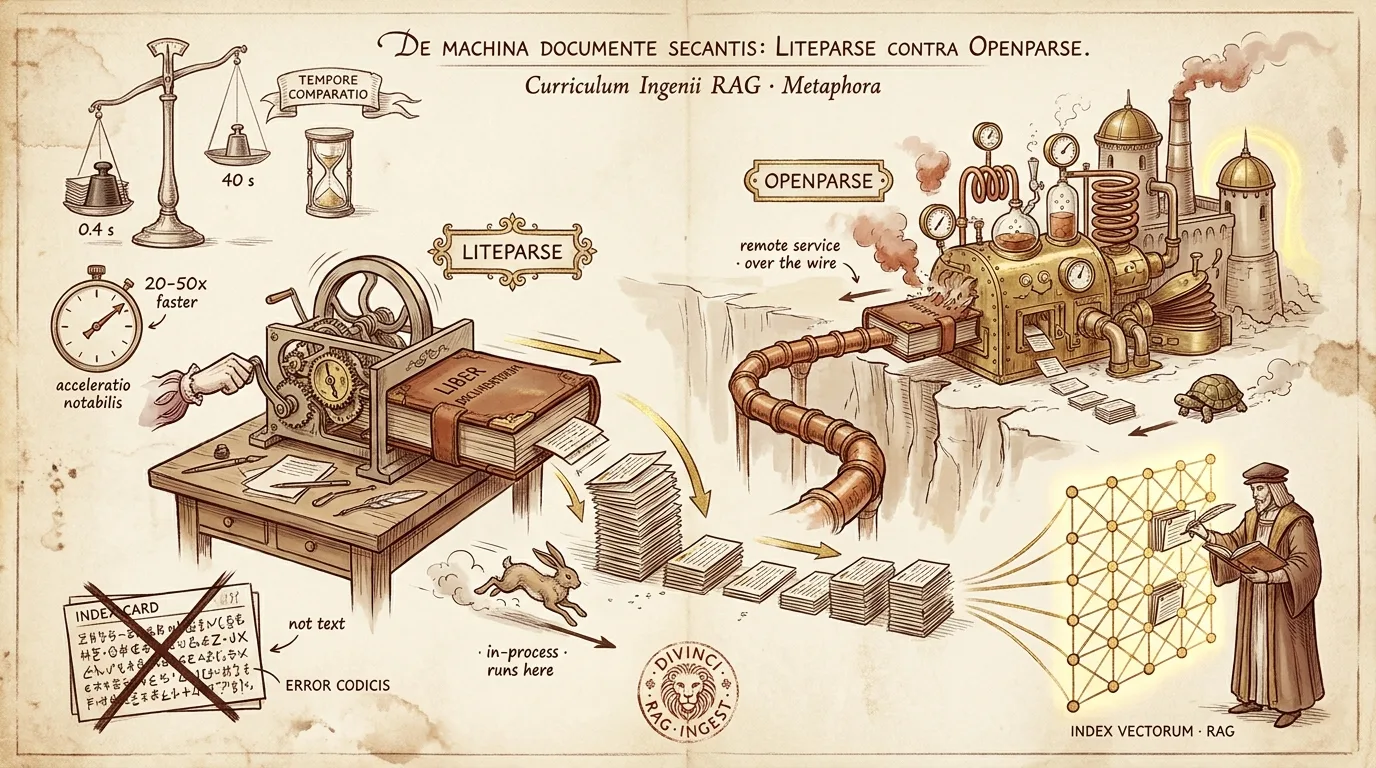
We replaced the PDF parser in our RAG ingestion pipeline — from OpenParse (a remote Python service that converts PDFs to markdown, then does layout analysis) to LiteParse (@llamaindex/liteparse, a Rust/pdfium engine running through a Node native binary). On our corpus of nutrition books and clinical position papers:
| LiteParse | OpenParse | |
|---|---|---|
| Speed | 0.4–6 s / document | 17–69 s / document |
| Extraction quality | 100% clean text | 100% clean text |
| Operational footprint | one in-process binary | a separate service to keep online |
- ~20–50× faster parsing
- Equivalent extraction quality on text-layer PDFs (both 100% printable text, identical key-term recall)
- Simpler ops — no second service to deploy, route, and keep warm
But the headline number isn’t the interesting part. The interesting part is the four ways we got it wrong first.
The setup
We run RAG over a corpus of nutrition-science books and clinical position papers (hundreds of pages each, plus ~20 shorter papers). The ingestion pipeline turns each PDF into text → chunks → embeddings. The parser sits at the front of that pipeline, and it had quietly broken in production: our OpenParse service’s hostname had lost its DNS record, so every book PDF was failing to ingest.
The first non-obvious thing we learned: “MarkItDown” is not a separate thing from OpenParse — it’s an endpoint on the OpenParse service. Our pipeline converts every PDF to markdown before the downstream chunker sees it. So even though we’d “switched the chunker,” PDFs were still hard-coupled to a service that was down. To actually decouple PDFs from OpenParse, we needed a parser that reads PDFs directly.
Enter LiteParse.
Wrong turn #1: LiteParse inline in the edge worker
LiteParse’s pitch is “runs entirely locally via Rust bindings, no cloud dependency, no API keys.” Our chunking runs in a Cloudflare Worker, so the obvious move was to call LiteParse inline in the Worker and hand it the raw PDF bytes.
It crash-looped:
Failed to initialize LiteParse session:
TypeError [ERR_INVALID_ARG_VALUE]: The argument 'path' must be a file URL object,
a file URL string, or an absolute path string. Received 'undefined'
Root cause: @llamaindex/liteparse is a Node.js napi native binary — it expects a Node filesystem (fs/path). Cloudflare Workers don’t have one. There is a separate package, @llamaindex/liteparse-wasm, built for browsers and edge runtimes — but the one in our dependency tree was the Node binary.
Lesson: “no cloud dependency / runs locally” ≠ “runs anywhere.” A Node-native module and an edge/WASM module are different artifacts that happen to share a name prefix. Check which one you actually imported before you wire it into an edge runtime.
The footgun: 2,690 garbage chunks in production
Here’s the cautionary part. When inline LiteParse failed, the worker did exactly what it was designed to do: fall back to the next chunker. But that fallback got handed the raw PDF (because we’d told the pipeline to skip the markdown conversion for this path). The fallback chunker isn’t a PDF parser — it read the compressed-PDF binary as if it were text, produced 2,690 “chunks” of %PDF-1.5␍%␍␊1013 0 obj…, and embedded them into our production vector index. The file even reported completed.
Lesson: a fallback chain is only safe if every link shares the same input assumptions. “Skip conversion for parser A” silently changed the input for fallback parser B. Guard your fallbacks, and sanity-check chunk text before embedding — a chunk that starts with
(Cleaning these up later surfaced a real bug — see the appendix.)
The realization: LiteParse needs Node, and we already had the host
If LiteParse’s Node SDK needs Node, run it in Node. We didn’t need to build a Rust server or stand up new infrastructure — we already had chunks-workflow-server, a Node + Express service on Cloud Run with a /pipeline/chunk endpoint that wraps our parsers. The Worker can offload chunking to it with two env flags. So the architecture became:
chunks-workflow (CF Worker)            chunks-workflow-server (Cloud Run · Node)
  ── queue: file to chunk ──►  POST /pipeline/chunk { fileUrl, "liteparse" }
                                   └─► @llamaindex/liteparse (napi + libpdfium) ─► chunks
  ◄── chunks ──────────────────────────────────────────────────────────────────┘
  embed → vector index
The Worker stays at the edge for orchestration; the one step that needs a real filesystem runs in the one place we already had a real filesystem.
Three bugs to actually ship it
The service existed but had never been deployed with the LiteParse chunker. Getting it live took three fixes — each a small, generalizable lesson:
Missing dependency. A new file imported
@aws-sdk/client-s3, but the dep was never declared inpackage.json. The Docker build’s type-check failed with “Cannot find module ‘@aws-sdk/client-s3’.” Declare the dep.ESM-only package in a CommonJS service → crash-loop.
@llamaindex/liteparseis pure ESM (itsexportsmap has only animportcondition — norequire). The service compiles to CommonJS, so a staticimport { LiteParse }became arequire()and the container died at startup:ERR_PACKAGE_PATH_NOT_EXPORTED: No "exports" main defined. The fix is to import the runtime class via a dynamicimport()(which survives the CJS transpile as a real ESM import) and keep the types as a type-only import.OCR defaulted on, with no OCR backend. The chunker defaulted
ocrEnabled: true, but the container has no working Tesseract — so a 353-page book died with “OCR failed: builder error.” These are digital PDFs with text layers; they don’t need OCR. Default it off, and opt in when you have a backend.
Bonus gotcha: the napi binary ships per-platform. The linux-x64-gnu binary is bundled (Cloud Run is linux/amd64 — works); the darwin-arm64 binary isn’t, so a local Mac smoke-test failed loudly and looked scary. A red herring. Test on the platform you deploy to.
Wiring it up, without a load balancer
To let the Worker reach the Cloud Run service, we enabled the service’s default *.run.app URL and gated it at the app layer with a shared worker-auth secret. That sidesteps the entire load-balancer + DNS-record provisioning dance — the exact thing that had broken OpenParse in the first place. One env var on the Worker, and LiteParse chunking flows to Node.
The side-quest: the source bytes were gone
A subtle migration scar surfaced here. The book PDFs’ source bytes had expired out of production object storage (they’d been stored under temporary upload keys). LiteParse — which fetches the file directly — exposed this as source missing 404s that OpenParse’s failures had been masking (OpenParse died before it ever tried to fetch the source). We byte-copied each book from staging storage to the production key and re-queued. 41 of 43 book documents completed via LiteParse — 72,342 real chunks, OpenParse-free.
The A/B: LiteParse vs OpenParse, head to head
With OpenParse brought back online, the same /pipeline/chunk endpoint runs both parsers — a clean A/B harness on identical production source PDFs. Same files, same machine, one warm run each.
The raw numbers, with chunk counts:
| LiteParse | OpenParse | Speedup | |
|---|---|---|---|
| Preventing & Treating Cancer | 25 ch / 0.40 s | 6 ch / 17.3 s | 43.5× |
| Folate (position paper) | 24 ch / 0.42 s | 6 ch / 19.2 s | 46.2× |
| Multivitamins (position paper) | 38 ch / 0.46 s | 11 ch / 24.2 s | 52.7× |
| Immunity (2-page) | 505 ch / 1.7 s | 89 ch / 34.5 s | 19.9× |
| Fast Food Genocide (353 pp) | 651 ch / 2.3 s | 127 ch / 39.3 s | ~17× |
| Eat to Live (405 pp) | 756 ch / 6.4 s | 136 ch / 68.6 s | ~11× |
Two things jump out. First, LiteParse emits ~4–5× more chunks at the same target size — finer retrieval units. (Caveat below: that’s partly a chunking-strategy artifact.) Second, the speedup factor itself depends on document size:
Most of OpenParse’s wall-clock time is fixed overhead, not per-page work. That’s why a tiny position paper sees 50× and a 405-page book “only” sees 11×.
Quality is a tie
Speed is meaningless if the faster parser garbles the text. So we scored extraction fidelity directly: concatenate each parser’s full output and measure the share of printable characters (a garble detector), the share of tokens that look like real words, and recall of per-document key terms.
| Parser | printable % | real-word % | key-term recall |
|---|---|---|---|
| LiteParse | 100 | ~100 | 5/5 · 5/5 · 4/5 |
| OpenParse | 100 | ~100 | 5/5 · 5/5 · 4/5 (same miss) |
On these text-layer PDFs, extraction fidelity is a dead tie. Both produce clean text, both hit ~100% real-word ratios, and they share the exact same key-term recall — including missing the same term on one document, because that term wasn’t present in the source either way, not because a parser dropped it. Neither garbles; neither drops key content.
So the decision is speed + output structure + operational footprint — where LiteParse wins decisively — not extraction quality.
The verdict
- Speed: LiteParse wins ~20–50×, widest on small documents.
- Granularity: LiteParse emits finer chunks at the same target size. (Caveat: we used a naive by-character chunker on LiteParse vs OpenParse’s layout-aware blocking — a fully fair comparison fixes the post-parse chunker.)
- Quality: a tie on text-layer PDFs.
- Ops & cost: LiteParse is one in-process binary — no separate service to keep warm, and 20–50× less parse compute means dramatically cheaper bulk re-indexing. OpenParse is a standalone Python service you have to deploy, route, and keep online — the thing that broke in the first place.
Recommendation: default to LiteParse. Reach for OpenParse when you specifically need its layout and table strengths — which we did not stress-test here — or when you’re already running MarkItDown for non-PDF formats.
What we did NOT test (be honest in the post)
- Scanned / image-only PDFs where OCR is the whole game. We ran OCR off; these were digital PDFs with text layers.
- Tables, multi-column reading order, figure/caption association — OpenParse’s reputational strengths. The two could genuinely diverge here.
- Retrieval quality downstream. We measured extraction, not “does the chat answer better.” A fair follow-up: embed both, run a query set, score retrieval.
- Variance and cold starts. Single warm run, no error bars. Re-run N≥3 and report the median before betting anything important on the exact multiples.
Appendix: the orphan-purge bug we found cleaning up our own mess
Deleting those 2,690 garbage chunks surfaced a real bug in our cleanup-orphans endpoint. It listed orphaned chunks via the direct database REST API but deleted them through a per-vector worker dispatch — which returns “Not Found” for our newer vector backend. So it reported orphansFound: 18, orphansDeleted: 0: it found the garbage and couldn’t touch it. The fix: delete through the same direct-REST path the listing already uses. After deploying, orphansDeleted: 18, 0 remaining.
Sometimes the best bug reports come from cleaning up after yourself.
Reproduce it
# Same harness, any PDF reachable by URL (e.g. a presigned link):
curl -X POST "$PIPELINE_URL/pipeline/chunk" \
  -H "Content-Type: application/json" \
  -d '{"fileUrl":"<pdf-url>","processor":"liteparse",
       "config":{"ocrEnabled":false,"chunkingStrategy":"by_character","maxTokens":1024}}'
# swap "liteparse" → "openparse" for the other side.
Ready to Build Your Custom AI Solution?
Discover how Divinci AI can help you implement RAG systems, automate quality assurance, and streamline your AI development process.
Get Started Today