



The short version
You can now create a hosted Hermes agent inside Divinci — currently in early access.
Hermes — NousResearch’s open agent — is a favorite for people who want a capable, tool-using assistant they actually control. The catch has always been the operational tail: you have to run it somewhere, keep a provider key on it, and expose it safely if you want to reach it from more than one place.
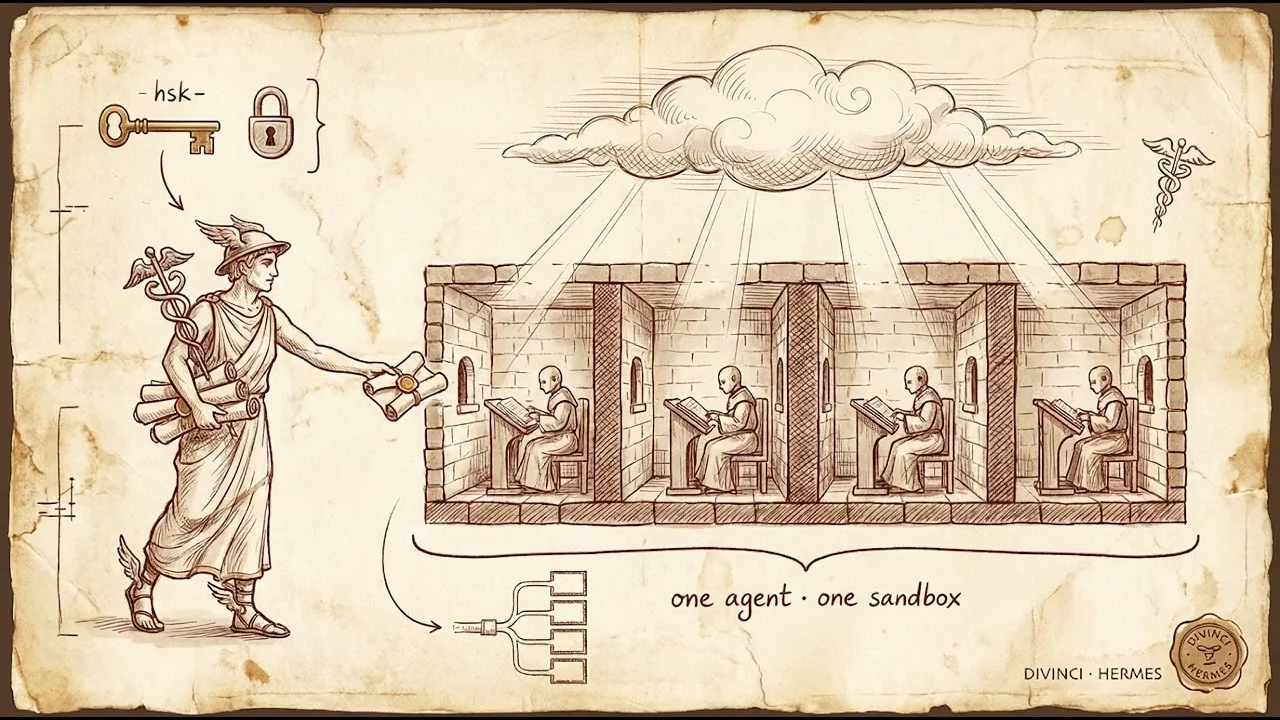
Hosted Hermes Agents remove that tail. Give an agent a name, a model, and a persona, and Divinci runs it for you in its own isolated Cloudflare Sandbox container. Then you can:
- chat with it in the Divinci web app, or
- connect a local Hermes, the Hermes desktop app, or any OpenAI-compatible client to it through a per-agent proxy URL and key.
No servers to manage, no keys sitting on a VM, and — the part we spent the most care on — no way for one agent to reach another.
This post is in two halves: what it does, then how it works.
New to Hermes? "The Case for Open Models in Production" — Arize Observe 2026. Video © NousResearch.
Who it’s for
Three audiences kept coming up:
- People who already run Hermes locally and want a stable, always-on endpoint they can point their local gateway or desktop app at — without port-forwarding, a reverse proxy, or babysitting a box.
- Teams standing up a customer-facing agent who want per-agent isolation, a revocable key, and usage metered to a workspace wallet, without building the multi-tenant plumbing themselves.
- Builders wiring Hermes into their own product through the OpenAI API surface they already target.
If you’ve ever thought “I like Hermes, I just don’t want to operate it,” this is for you.
The architecture
Under the hood, a hosted agent is a small stack with a deliberately boring shape:
Local / desktop Hermes ─┐
OpenAI-compatible client ─┼─► Divinci  /api/v1/hermes-proxy   (self-auth: hsk- key)
In-app chat panel ───────┘        │   resolves the agent BY KEY, server-side
                                   ▼
                     public-api  (Auth0 / RBAC + wallet metering)
                                   │   service-auth + trusted agent id
                                   ▼
              hermesworkers Worker ─► Durable Object (one per agent)
                                   ▼
                     Cloudflare Sandbox container ─► Hermes ─► model provider
The key design decision: one Durable Object and one Sandbox container per agent. Not one shared Hermes with tenant IDs threaded through it — one whole container each, addressed by a stable per-agent key.
That costs a little more than a shared process would. It buys something we weren’t willing to fake: structural isolation. Hermes executes tools on behalf of prompts — it reads and writes files, holds sessions, keeps memory. The only way to be sure one customer’s agent can’t touch another’s is to not share the thing that holds that state. So we don’t.
Containers are lazy, which keeps that affordable: creating an agent provisions nothing. The container spins on the first chat and sleep-evicts when idle. You pay for agents you actually use.
Two trust boundaries
Security here comes down to two edges, and both are enforced on the server — never on data the caller controls.
Boundary 1 — the customer edge. Anyone can hit /api/v1/hermes-proxy with a proxy key (hsk-…). The critical property is that the agent is resolved from the key, server-side. The caller never passes an agent ID. There is no header, no path segment, no field they can set to address a different tenant’s container. Present a valid key, reach exactly the one agent it belongs to — nothing else.
Boundary 2 — the internal edge. Between Divinci’s API and the Worker that owns the containers, requests carry a service-auth secret and a trusted agent id. That id is trusted precisely because only our backend sets it, behind the secret. Customers never hold that secret and never reach the Worker directly.
Get those two edges right and the isolation guarantee holds top to bottom.
Bring your own key
By default an agent uses the platform’s provider key. But you can bring your own — your OpenAI, Anthropic, OpenRouter, or Gemini key — so provider spend lands on your account.
When you do, that key is field-encrypted at rest and decrypted only in the moment it’s forwarded to your container. It is never written to a log and never returned in an API response — read an agent back and you’ll see the provider name and a boolean “has a key,” never the key itself.
The hardening, briefly
The isolation model is the headline; a few smaller guards make it hold up in practice:
- Non-root containers. The Hermes gateway drops privileges at boot. Tool execution — the risky part — never runs as root.
- A path-locked proxy. The customer proxy normalizes the requested path and allowlists it to the Hermes API surface (
/v1/*,/api/*,/health). Crafted..traversal is collapsed before the allowlist check, so a request can never walk out of the agent’s namespace into a sibling route. Request bodies are capped so a client can’t exhaust memory. - Server-minted keys, with caps. Proxy keys are 160-bit and generated server-side; there’s a ceiling on agents per workspace to bound both cost and blast radius.
- Metered and reversible. Every turn escrows against your workspace wallet before dispatch and reverses cleanly on any failure — attributed to the acting user, charged to the workspace.
All of the above is covered by unit tests that assert the invariants directly: that secrets never serialize into a response, that the proxy rejects a missing or foreign key, that traversal can’t escape, and that billing attributes the right payer to the right runner.
Connect your local Hermes
Because the proxy speaks the OpenAI API, connecting is two lines. Point any OpenAI-compatible client at your agent:
export OPENAI_BASE_URL="https://api.divinci.app/api/v1/hermes-proxy"
export OPENAI_API_KEY="hsk-your-agent-proxy-key"
Or drop the same URL and key into a local Hermes gateway as its GATEWAY_PROXY_URL, and your local Hermes drives the hosted agent as a remote server. The full /v1/* surface — chat completions, models, sessions — is proxied straight through to your container.
Let the assistant set it up
If you’d rather not touch config, the in-app Divinci Agent is now context-aware on the Hermes Agents page and can create one for you. Ask it to “create a Hermes agent,” confirm, and it mints the agent and hands you the proxy key to connect your clients.
How we use Hermes at Divinci
We didn’t build hosted Hermes for a launch video — we built it because we already run on Hermes, and we wanted it running on real infrastructure instead of tied to a laptop that sleeps.
We’re our own first user. Hermes is wired into our Divinci CLI and our orchestration layer, so it’s the first thing to run every new capability we ship — running commands, poking at the edges, breaking things so our customers don’t have to. It’s the difference between “we think this works” and “Hermes ran it all afternoon, here’s the log.”
It keeps the queue calm while we sleep. Hermes monitors our configured Slack channels: on a fresh thread it pulls the relevant docs and past resolutions, drafts a reply, and flags the one thing that genuinely needs a founder’s eyes. By morning the thread is already calm and the only decision left is “yes, send it.”
It runs the unglamorous conveyor. Behind every tutorial and staged demo is a pipeline — spin up the staging app, record the walkthrough, check the Cloudflare Access gate, assemble the cuts. Hermes runs it end to end and hands us a finished asset. Things that used to block us just… don’t anymore.
The moral is always the same: Hermes does the work, not just the demo. Hosting it on Cloudflare through Divinci is what takes it off a laptop and onto managed infrastructure that wakes on demand — no server to babysit, no idle cost — which is exactly what this post has been about.
What’s next
Today you get isolated hosting, in-app chat, the OpenAI-compatible proxy, and bring-your-own-key. On the roadmap: richer per-agent dashboards, finer-grained tool permissions, and deeper wiring into the Divinci Agent so setup is entirely conversational.
If you run Hermes — or want to — and you’d like it hosted, isolated, and reachable from anywhere without operating it yourself, talk to us. We’d love to get your Hermes into the cloud.
Self-hosting is built on our open-source hermesworkers Worker. The container runtime needs Cloudflare Containers and a few secrets — see the repo README.
Ready to Build Your Custom AI Solution?
Discover how Divinci AI can help you implement RAG systems, automate quality assurance, and streamline your AI development process.
Get Started Today